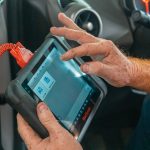
If you rent cars often, take road trips, or drive an older daily car, you have probably wondered: how often should you scan your car with an OBD2 scanner? I used to only think about scanning when the check engine light came on. Now, I see it as a simple habit that can help catch small problems before they turn into bigger travel headaches.
For rental car travelers, this matters even more. You may pick up a car at the airport, drive hundreds of miles, and return it before anyone has time to explain what was already wrong with it. A quick scan can give you useful information before you leave the lot.
In this guide, I’ll explain when to scan your own car, when to scan a rental car, what codes actually mean, and how to use an OBD2 scanner without overthinking it.
📷 Upload Image Here
You should scan your personal car with an OBD2 scanner about once a month, before long road trips, after the check engine light appears, and after any repair. For rental cars, I recommend scanning once at pickup, especially before leaving the airport lot. You do not need to scan every day unless a warning light appears, the car feels strange, or you are on a long trip and want extra peace of mind.
How Often Should You Scan Your Car With an OBD2 Scanner?
For most drivers, scanning once a month is a good routine. It is simple, fast, and does not hurt the car. If you drive often, use your car for work, or travel with family, monthly scanning gives you a better picture of your car’s health.
For rental cars, I use a different rule. I scan the vehicle once before leaving the rental lot. If I am taking a long road trip, I may scan again during the trip if a warning light appears or the car starts acting odd.
| Situation | How Often to Scan | Why It Matters | Priority |
|---|---|---|---|
| Personal daily car | Once a month | Helps catch stored codes early | High |
| Before a road trip | Once before leaving | Reduces the chance of surprise issues | Highest |
| Rental car pickup | Once before leaving the lot | Documents possible pre-existing issues | Highest |
| Check engine light appears | Scan right away | Helps identify the problem area | Highest |
| After a repair | Once after driving a few days | Checks if the issue returns | Medium |
What an OBD2 Scanner Actually Checks
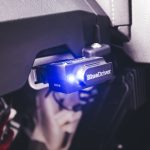
An OBD2 scanner reads information from your car’s onboard diagnostic system. Most cars sold in the United States since 1996 use OBD2. The scanner connects to a port usually found under the dashboard near the steering wheel.
It can show trouble codes related to the engine, emissions system, fuel system, sensors, and other vehicle systems. Some advanced scanners can also read ABS, airbag, transmission, and battery data.
The National Highway Traffic Safety Administration is a helpful source for general vehicle safety information, but an OBD2 scanner is useful because it gives you vehicle-specific clues.
Common things an OBD2 scanner may show
- Check engine light codes
- Pending codes that have not triggered a light yet
- Emissions readiness status
- Fuel trim and sensor data
- Battery or charging clues on some scanners
- Freeze frame data from when a problem happened
Why Rental Car Travelers Should Care
When you rent a car, you are driving a vehicle you do not know. You do not know how the last renter treated it. You also do not know if a warning code was recently cleared before you arrived.
I am not saying every rental car has hidden problems. Most rental cars are fine. But if you are about to drive from Phoenix to Sedona, Denver to the mountains, or Orlando to the coast with your family, a two-minute scan is a smart step.
I also recommend pairing the scan with a simple rental car inspection checklist. Look at the tires, lights, windshield, fuel level, warning lights, and body damage before leaving.
When I scan a rental car
- Before leaving the airport rental lot
- Before a long road trip in an unfamiliar car
- If the check engine light appears
- If the car shakes, smells odd, or feels weak
- Before returning the car if there was a warning light during the trip
Best Times to Scan Your Own Car
If you own the car, you have more control. You can scan it on a set schedule and watch patterns over time. That is why I like monthly scanning for personal cars.
1. Scan once a month
Monthly scanning is often enough for normal drivers. It helps you spot pending codes early without becoming obsessed with every small reading.
2. Scan before a long trip
Before a road trip, I like checking the car a few days before leaving. That gives you time to act if the scanner finds something serious. It is much better to find out at home than on the side of the highway.
3. Scan when a warning light appears
If the check engine light comes on, scan as soon as you can. A solid light may mean the car can still be driven carefully, but you should not ignore it. A flashing check engine light can mean a more serious issue, so stop driving when safe and get help.
4. Scan after repairs
After a mechanic fixes a problem, scan the car again after a few days of normal driving. This helps confirm that the same code has not returned.
📷 Upload Image Here
Do You Need to Scan Every Day?
No, most drivers do not need to scan every day. Daily scanning can create stress because cars often store small data points that do not always mean a major problem.
Scan more often only when there is a reason. For example, scan if the check engine light comes on, the car loses power, fuel economy drops fast, or you hear strange noises.
For most people, the goal is not to become a mechanic. The goal is to make smarter choices before a trip, during a rental, or when talking to a repair shop.
OBD2 Scan Schedule for Different Drivers
| Driver Type | Recommended Scan Schedule | Best Reason | Extra Tip |
|---|---|---|---|
| Occasional driver | Every 2–3 months | Basic peace of mind | Scan before long drives |
| Daily commuter | Once a month | Catch issues early | Track repeat codes |
| Road trip traveler | Before every major trip | Reduce trip problems | Scan tires and lights too |
| Airport rental car user | At pickup | Document unknown car condition | Take screenshots |
| Older car owner | Every 2–4 weeks | Watch aging sensors and systems | Do not ignore repeat codes |
What to Do After You Find a Code
A code is a clue, not a final diagnosis. For example, an oxygen sensor code does not always mean the oxygen sensor itself is bad. It may point to an air leak, fuel issue, wiring problem, or another cause.
This is where many drivers make mistakes. They see a code, buy a part, and hope it works. That can waste money. A better move is to write down the code, check the symptoms, and decide if you need a mechanic.
Consumer education sites like Consumer Reports car advice can help you understand car ownership basics, but a local mechanic is still best for repairs that affect safety.
Simple steps after scanning
- Write down or screenshot the code.
- Check if the code is active, pending, or stored.
- Look for warning lights or driving symptoms.
- Do not clear codes before documenting them.
- Ask a mechanic if the code affects safety.
Common Mistakes Renters and Drivers Make
OBD2 scanners are useful, but they can also confuse people if used the wrong way. Here are the mistakes I try to avoid.
- Clearing codes before taking screenshots
- Assuming one code means one exact bad part
- Ignoring a flashing check engine light
- Scanning only after a problem gets serious
- Buying the cheapest scanner without checking features
- Forgetting to inspect tires, lights, and fluids too
When I scan a rental car, I take screenshots of the scan result before I leave the lot. If anything looks odd, I ask the rental desk to note it or switch the car. I do not clear codes on a rental vehicle.
Best Product Recommendations for OBD2 Scanning
You do not need a professional shop scanner for basic travel use. Most everyday drivers and rental car travelers are fine with a reliable Bluetooth OBD2 scanner or a simple handheld scanner.
EDITOR’S CHOICE
A Bluetooth OBD2 scanner is my favorite choice for rental car travelers because it is small, easy to pack, and works with a phone app. It is useful for checking codes before leaving the rental lot or before a long road trip. Look for one that reads check engine codes, pending codes, freeze frame data, and emissions readiness.
Check Price on AmazonA basic handheld OBD2 scanner can be a smart choice if you do not want to use a phone app. It is usually simple, affordable, and good for reading and clearing check engine codes on your own car. For rental cars, I would still use it only for reading and documenting codes.
View on AmazonIf you rent cars often, consider a scanner that offers clear app reports and easy screenshots. The goal is not to repair the rental car yourself. The goal is to understand warning lights, document possible pre-existing issues, and make better choices before a long drive.
View on AmazonWhat Features Should You Look For?
Not every scanner is the same. Some cheap scanners only read basic engine codes. Better models may show live data, freeze frame data, readiness monitors, and app-based reports.
- Reads and explains check engine codes
- Shows pending and stored codes
- Displays freeze frame data
- Works with iPhone or Android if Bluetooth-based
- Offers easy screenshots or reports
- Has clear instructions for beginners
- Does not require a confusing setup process
If you want a deeper buying guide, see my best OBD2 scanners for rental cars guide.
Safety Limits: What an OBD2 Scanner Cannot Do
An OBD2 scanner is helpful, but it is not magic. It cannot see worn tires, weak brakes, cracked glass, dirty oil, or loose suspension parts. That is why I never rely on a scanner alone.
The Insurance Institute for Highway Safety shares useful safety research, and it is a good reminder that vehicle safety is more than engine codes.
Before a long drive, combine an OBD2 scan with a basic visual check. Look at the tires, lights, mirrors, wipers, and warning lights.
📷 Upload Image Here
Quick Rental Car Scan Routine
Here is the simple routine I recommend for airport rentals. It takes only a few minutes and works well with a normal walkaround inspection.
- Start the car and check the dashboard for warning lights.
- Plug the scanner into the OBD2 port under the dash.
- Open the app or scanner menu.
- Run a full code scan.
- Take screenshots of any codes or “no code” results.
- Do not clear anything on a rental car.
- Ask the rental desk for help if you see serious warnings.
If the rental car has a check engine light before you leave, do not talk yourself into ignoring it. Ask for another car if possible, especially if you are traveling with kids, driving at night, or heading far from the airport.
How Much Does OBD2 Scanning Cost?
A basic OBD2 scanner can cost around the price of a simple travel accessory. Bluetooth models and advanced scanners usually cost more, but many travelers only need basic code reading and app reports.
Some auto parts stores may scan codes for you, but that does not help much when you are standing in an airport rental lot at 10 p.m. That is why frequent renters may find a small scanner worth packing.
Should You Clear Codes?
On your own car, you may clear codes after documenting them and fixing the issue. But I do not recommend clearing codes on a rental car. The vehicle is not yours, and clearing codes could remove useful history.
If you see codes on a rental, take screenshots and contact the rental company. If the car has a serious warning light or drives poorly, ask for a different vehicle.
Expert Tips from Alex
Keep your scanner in the same small pouch as your phone charger, tire pressure gauge, and travel documents. That way you do not forget it when switching cars or flying to another city.
Do not panic when you see a code. Write it down, look at the symptoms, and use it as a clue. A scanner helps you ask better questions, but it does not replace a trained mechanic.
Key Takeaways
- Scan your personal car about once a month.
- Scan before long road trips.
- Scan a rental car once before leaving the lot.
- Scan right away if a warning light appears.
- Do not clear codes on a rental car.
- Use scan results as clues, not final repair answers.
- Pair scanning with a visual inspection for better safety.
Frequently Asked Questions
How often should you scan your car with an OBD2 scanner?
Most drivers should scan their car about once a month. This is often enough to catch stored or pending codes without becoming stressful. You should also scan before long road trips, after the check engine light comes on, and after repairs. If you rent cars often, scan the rental car once before leaving the lot. You do not need to scan every day unless the car shows warning lights, runs poorly, or feels unsafe.
Should I scan a rental car before driving away?
Yes, it is a smart habit, especially at airport rental locations or before long road trips. A quick scan can show if the vehicle has stored or pending trouble codes. It does not replace a full inspection, but it adds another layer of information. I recommend taking screenshots of the scan results and not clearing any codes. If the car has a check engine light or serious warnings, ask the rental company for another vehicle.
Can scanning too often damage my car?
No, normal OBD2 scanning does not damage your car. The scanner is designed to read information from the vehicle’s computer. The main risk is not scanning too often; it is misunderstanding the results or clearing codes before documenting them. For most people, monthly scanning is enough. Scan more often only if you are troubleshooting a problem, preparing for a trip, or checking a warning light.
Should I clear codes after scanning?
On your own car, you may clear codes after saving the information and fixing the problem. But you should not clear codes just to turn off a warning light. If the issue is still there, the code will likely return. On a rental car, I do not recommend clearing codes at all. Take screenshots, tell the rental company, and ask for help if the vehicle has a warning light or driving problem.
Is a Bluetooth OBD2 scanner better for travel?
A Bluetooth OBD2 scanner is often better for travel because it is small and works with your phone. Many app-based scanners make it easy to save screenshots, read code descriptions, and keep records. That is useful for rental car pickups and road trips. A handheld scanner can also work well if you prefer a simple device with no app. The best choice depends on how often you travel and how much detail you want.
What should I do if my scanner finds a code before a road trip?
Do not ignore it, but do not panic either. First, take a screenshot or write down the code. Then check if the car has symptoms such as rough idle, poor acceleration, strange smells, or warning lights. If the code sounds serious or the car feels unsafe, have a mechanic check it before you leave. It is better to delay a trip than deal with a breakdown far from home.
Can an OBD2 scanner tell me if a car is safe?
An OBD2 scanner can help, but it cannot fully confirm that a car is safe. It reads computer codes, mostly related to engine and emissions systems. It may not show worn tires, weak brakes, suspension problems, cracked glass, or bad wipers. That is why I always combine a scan with a visual inspection. For rental cars, check the tires, lights, mirrors, windshield, dashboard warnings, and body damage before driving away.
Conclusion: My Practical Scan Schedule
My simple rule is this: scan your personal car once a month, scan before long trips, and scan rental cars once before leaving the lot. That schedule is easy to follow and gives you useful information without making car care feel complicated.
An OBD2 scanner is not a replacement for a mechanic or a good inspection, but it is one of the most useful tools a frequent traveler can carry. If you rent cars often, pair it with a road trip essentials checklist and a quick walkaround before every drive.