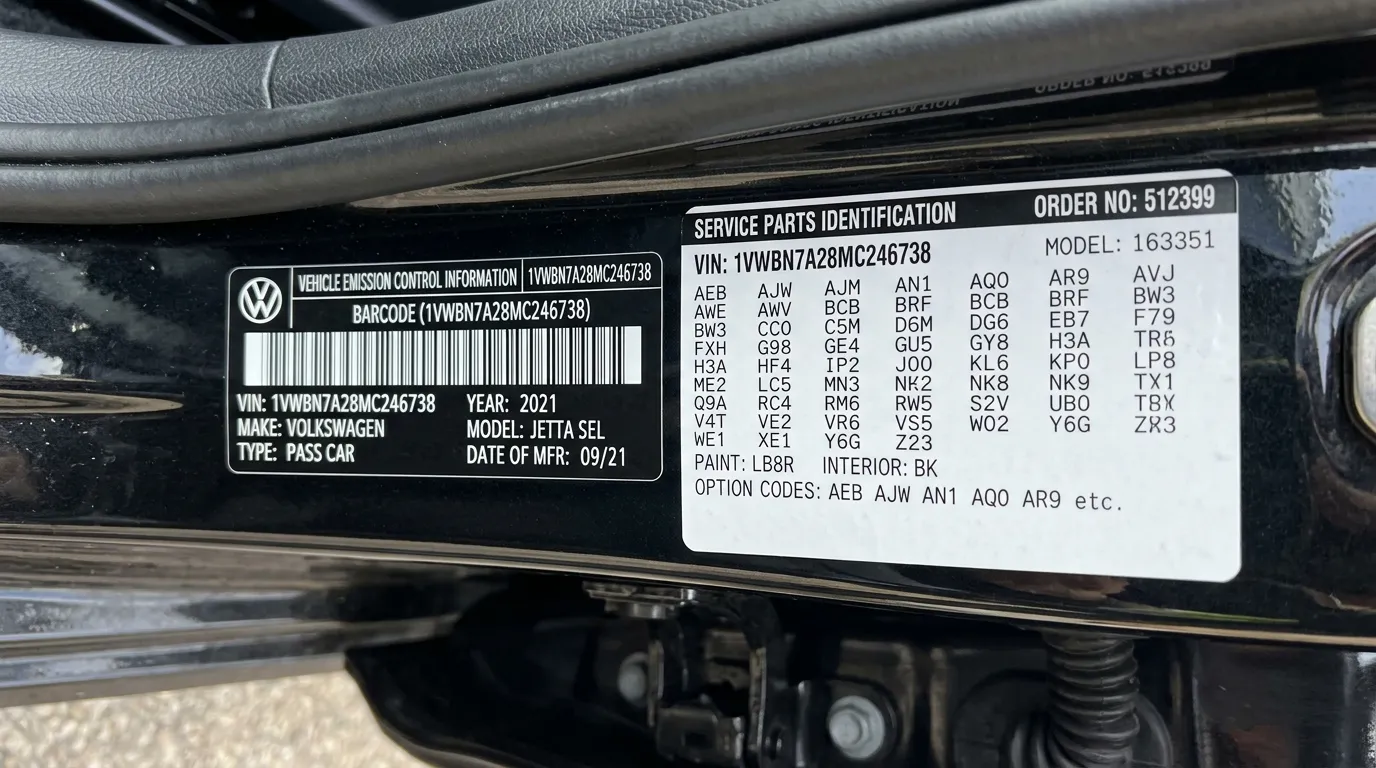
You can find your vehicle’s RPO codes by entering its 17-character VIN into a GM VIN decoder, checking the SPID/Service Parts Identification label in the glovebox or trunk, or asking a dealer for the build sheet. Enter the VIN into a trusted GM VIN/RPO lookup or open the glovebox label to get a clear list of factory option codes fast.
This article shows simple steps to pull those codes, explains what the three-character RPO entries mean, and helps you verify they match the car’s features. You’ll learn quick ways to confirm paint, engine, trim, and option packages so you can compare builds, order parts, or check value with confidence.
Key Takeaways
- Use the 17-character VIN or the SPID label to access factory option codes.
- Decode three-character RPO entries to identify equipment and packages.
- Verify RPOs against the build sheet or dealer records for accuracy.
Understanding RPO Codes
RPO codes identify the exact factory options and parts a vehicle left the plant with. They show engine, transmission, paint, trim, axle, and other factory-installed features in short codes found on labels or build sheets.
Definition and Purpose
A Regular Production Option (RPO) code is a three-character alphanumeric code that points to one specific factory option or part. Each code maps to a defined component or feature, such as an engine type (e.g., L83), a suspension package (e.g., Z71), or a paint color code.
Manufacturers use RPOs to record what the assembly line installed on a given VIN. Technicians, parts suppliers, and buyers read RPOs to match replacement parts, verify originality, or confirm factory equipment. RPO lists let a person know if a vehicle had factory upgrades or special packages without guessing.
How RPO Codes Differ by Manufacturer
Different automakers use RPO-like systems but with their own rules and code sets. General Motors uses the classic three-character RPO format and prints codes on the Service Parts Identification (SPID) label in the glovebox or trunk. Other brands may use more numeric VIN-based decoders or build-sheet references.
Some manufacturers embed option data directly in the VIN or a digital build record, while others keep the separate option list. This means a GM owner often finds detailed RPOs on a physical label, while owners of other makes may need dealer access or online VIN decoders to get the same level of detail.
Common Uses in Automotive Applications
Mechanics use RPO codes to order exact replacement parts and avoid fitment errors. For example, brake calipers or wiring harnesses can differ by RPO, so matching the code prevents buying the wrong item.
Buyers and restorers use RPOs to verify if a vehicle retains original equipment or had dealer-installed options. Insurance adjusters and vehicle inspectors also consult RPOs to confirm factory safety or equipment packages when assessing damage or value.
Locating Your VIN
The VIN is a 17-character code that identifies the exact vehicle and its build. It appears on the car itself and on documents like the registration, title, and window sticker.
Where to Find the VIN on a Vehicle
Most drivers find the VIN on the lower corner of the windshield on the driver’s side. It sits on a small metal plate visible through the glass and is easy to read from outside the car.
Other common spots include:
- Driver’s side door jamb label — a sticker near the latch with tire, weight, and VIN info.
- Engine bay firewall — stamped on metal or on a plate near the front.
- Under the spare-tire well or trunk floor — on a label or metal plate.
Inspect these areas with a flashlight if the print is worn. VINs on older cars may be stamped rather than printed, so look for a sequence of 17 letters and numbers without I, O, or Q.
Other Sources for the VIN
Vehicle documents almost always carry the VIN. Check the:
- Title and registration — both display the full 17-character VIN.
- Insurance card or policy — insurers list the VIN for coverage records.
- Window sticker / Monroney label — new cars have the VIN printed on the build sticker.
Dealership service records and the owner’s manual sometimes show the VIN. If the vehicle has a Service Parts Identification (SPID) label or QR code, that label often includes the VIN and RPO codes. For online lookups, the VIN appears in vehicle history reports and many VIN-decoder websites.
Decoding the Structure of a VIN
A VIN breaks into three parts: World Manufacturer Identifier, Vehicle Descriptor Section, and Vehicle Identifier Section.
- Positions 1–3 (WMI): country and manufacturer, like 1G for General Motors USA.
- Positions 4–9 (VDS): model, body type, restraint system, engine — these detail major features.
- Positions 10–17 (VIS): model year, assembly plant, and sequential production number.
The 10th character marks the model year (e.g., M = 1991 or 2021 depending on context). The 9th character is a check digit used to validate the VIN. Knowing these parts helps when cross-referencing a VIN with RPO or build-sheet data.
Accessing Vehicle Build Information
Find the VIN on the driver door jam or windshield, then use it to pull the exact factory options, paint code, and RPO list. The methods below show where to look, who can help, and which online tools give full build details.
Using Manufacturer Resources
The vehicle maker stores the most accurate build info. On many GM models, the Certification label or a QR code on the driver door contains the VIN and RPO data. Older cars often have a Service Parts Identification (SPID) label in the glovebox or trunk that lists RPO codes and paint/trim numbers.
To use manufacturer resources, scan the QR code or read the SPID label and note each RPO code. Then visit the brand’s official owner portal or parts site and enter the VIN. Manufacturer sites may also offer PDF build sheets or parts lookups tied to that VIN.
Manufacturer data is the best match for factory-installed equipment. It shows original engine, transmission, axle, trim level, and factory options as shipped from the plant.
Authorized Dealership Tools
A dealer can access the factory build and service records for a specific VIN. Service departments use internal systems to pull the original build sheet, broadcast sheet, and RPO list tied to that VIN. They can also print or email the information.
When contacting a dealer, provide the full 17-character VIN and the vehicle model year. Dealers may charge a fee or require ownership proof for detailed documents. For warranty or recall checks, dealers can also confirm which options are covered and whether the vehicle matches factory specs.
Dealers are useful when manufacturer portals don’t show older builds, or when a physical copy of the build sheet is needed for repairs or resale.
Third-Party Decoder Platforms
Several online VIN decoders and enthusiast sites decode VIN and map GM RPO codes to readable descriptions. Tools vary: some decode the 17-character VIN only, while others also translate RPO codes from a SPID or QR scan into option names like “M6M transmission” or “ZW9 Heavy Duty Suspension.”
Choose sites that let users enter VIN and paste SPID/RPO codes for a full match. Free tools give basic option lists; paid services may show factory build sheets, broadcast sheets, and parts cross-references. Cross-check results with manufacturer or dealer data, since third-party databases can be incomplete or out of date.
Extracting RPO Codes from VIN
The VIN can reveal the vehicle’s RPO codes through online tools, dealer or manufacturer support, and official labels or documents. Each path requires the complete 17-character VIN and may show codes in different formats.
Online Lookup Methods
Websites and VIN decoders let a user enter the 17-character VIN to pull factory option data. Reputable tools include manufacturer VIN decoders and specialized GM RPO decoders. Free sites may show basic RPOs, while paid services give full option lists, build sheets, and sometimes factory paint and trim codes.
Steps to use online tools:
- Copy the full VIN exactly as shown on the vehicle.
- Paste it into the decoder field and submit.
- Review the returned RPO list or build sheet for codes like G80 or Z71.
Check results against multiple sources when possible. Online tools can omit rare or dealer-added options, so confirm important codes with manufacturer resources.
Contacting Customer Support
Calling or emailing a dealer or the manufacturer yields official RPO information tied to the VIN. The dealer parts or service department can run the VIN through internal systems and provide a Service Parts Identification (SPID) sheet or a printout of RPOs.
What to provide:
- Full 17-character VIN.
- Vehicle make, model, and year.
- Proof of ownership if requested.
Response times vary; dealers often return results the same day. Manufacturer customer support can provide build data but may route requests through regional offices, which can take longer.
Official Documentation Sources
Official documents and labels on the vehicle contain RPO codes in many cases. Common places to check include:
- Service Parts Identification (SPID) sticker often in the glove box, trunk, or under the spare tire.
- Certification label with QR code (on newer GM models) that encodes VIN and RPOs.
- Factory build sheet or window sticker retained with sale paperwork.
If the label is missing or faded, request a copy of the factory build sheet from the dealer using the VIN. Physical labels provide the most direct record of factory-installed options and reduce the chance of error from third-party decoders.
Verifying RPO Codes for Accuracy
Check the decoded codes against trusted sources, verify how each code maps to parts or options, and watch for common mistakes like transposed characters or regional differences.
Cross-Referencing with Parts Catalogs
They should pull up an OEM parts catalog or dealer parts site and enter the RPO code and VIN. Parts catalogs list exact part numbers, option names, and build notes tied to those RPOs.
If the code corresponds to a specific part (for example, a towing package or axle ratio), the catalog will show the matching assemblies and part numbers. That confirms the code’s practical meaning.
Use multiple catalogs when possible: dealer parts, aftermarket databases, and GM build-sheet lookups. If two sources give the same part number and description, the RPO is likely correct.
If catalogs disagree, prioritize OEM dealer data or the vehicle’s factory build sheet over third‑party decoders.
Interpreting Decoded Results
They must read each RPO in context of the vehicle’s model year, trim, and region. Some RPOs change meaning across years or models, so the same code may not mean the same feature on different cars.
Match RPOs to clear, specific items—axle ratio, transmission code, paint code—rather than vague descriptions.
Record the VIN, RPO string, and the exact wording from the catalog or dealer response. That creates a traceable link if later service or parts ordering requires proof.
When a code maps to multiple possible items, check adjacent RPOs on the build sheet; related codes often appear together and resolve ambiguity.
Identifying Potential Errors
They should watch for common transcription errors: confusing 0 (zero) with O (letter), 1 (one) with I (letter), and similar pairs. These small mistakes cause wrong lookups.
Also check for truncated RPO lists—SPID labels or online decoders sometimes omit rare or dealer-installed options.
Confirm the VIN was entered correctly and that the build sheet matches the vehicle’s model year. If results still seem off, contact the dealer parts department or use the factory service center to request the original broadcast sheet.
Keep copies of screenshots or printouts from each source. That helps resolve disputes when parts departments or buyers question the RPO interpretation.
Applications of RPO Codes
RPO codes identify exact factory options and parts for a vehicle. They help match replacement parts and confirm what was installed at the factory.
Selecting Compatible Replacement Parts
RPO codes let a buyer or technician pick the exact part that fits the vehicle. For example, knowing the RPO for engine type, transmission, or axle ratio avoids ordering the wrong component. This prevents returns and extra labor.
When shopping, they can give the part seller the VIN or the specific RPO code (like L83 or M30). Parts departments use that code to check fitment across model years and submodels.
A short checklist helps:
- Provide VIN and RPO code to parts counter.
- Verify part numbers against the RPO description.
- Confirm software or calibration matches (ECU, sensors).
This process saves time and reduces the chance of buying incompatible mechanical or electrical parts.
Tracking Service Histories
RPO codes provide a baseline of factory equipment that technicians use when logging services. When a service record lists RPOs, it shows which original parts or calibrations were present at build.
This matters for recalls and warranty claims. Service centers compare installed parts and RPOs to recall lists to see if the vehicle is affected.
Maintenance trackers can also use RPOs to filter records by specific systems, such as air suspension or towing package. That makes searching service histories faster and more precise.
Recording RPOs with each service gives future owners and shops a clear view of original configuration and any later changes.
Considerations for Older and Imported Vehicles
Older and imported vehicles often lack the same easy access to RPO lists that newer domestic models have. Owners may need to use multiple sources, like archived dealer records, physical labels, and country-specific databases, to verify option codes.
Challenges with Archived Information
Records for vehicles over 15 years old can be incomplete or stored only in paper form at dealerships. Service departments or corporate archives may still hold build sheets, but staff often need the VIN and a formal request to search physical files.
Labels that once listed RPOs — like the glovebox or trunk SPID sticker — may be faded, removed, or illegible. Salvage history, prior repairs, or repainting can erase these stickers, forcing reliance on factory build sheets or VIN decoders that pull manufacturer archives.
Online VIN decoders sometimes lack older factory data or show generic option groupings instead of specific RPOs. In that case, contacting a marque-specific owner forum or an independent shop with factory access tools often yields more precise results.
Special Requirements for International Models
Imported vehicles can use different option codes or local variants not found in U.S. RPO lists. Manufacturers often assign country-specific RPOs for emissions, lighting, or trim; the same VIN structure might not map directly to U.S. option codes.
Dealers in the vehicle’s original market hold the most accurate build information. Owners should provide the full VIN and, if possible, the original export paperwork to speed the search. Translation of code meanings may be required for non-English markets.
Aftermarket conversions (left/right hand drive, emission retrofits) can change or eliminate original options. In those cases, inspection of the vehicle and comparison with the original build sheet or dealer notes gives the best chance of identifying true factory RPOs.
Data Security and Privacy Concerns
When someone looks up RPO codes by VIN, they share a vehicle’s unique identifier with websites or dealers. The VIN can link to ownership, service history, or location data if combined with other records.
Users should prefer trusted sources that show clear privacy policies. Reputable services limit data collection and explain how long they keep information and who can access it.
Avoid public Wi‑Fi when submitting VINs to online tools. Unencrypted connections make it easier for attackers to intercept the VIN and related queries.
Consider what data a site asks for beyond the VIN. Requests for personal contact details, photos, or documents increase privacy risk. Share only what is necessary for the lookup.
Some newer vehicles include RPOs in a QR code on the certification label, which reduces need to send the VIN to third parties. Scanning a manufacturer QR code locally keeps more control over data.
If a dealer or service provider stores RPO results, ask about their data retention and security practices. They should use basic protections like encryption, access controls, and secure disposal of records.
A quick checklist:
- Verify site is reputable and uses HTTPS.
- Read the privacy policy for data use and retention.
- Limit extra personal details shared.
- Prefer local QR scans or dealer scans over unknown websites.
FAQs
| Question | Answer |
|---|---|
| What is an RPO code? | RPO (Regular Production Option) codes list the factory options and parts a vehicle left the factory with. They help identify paint, engines, trim, and equipment. |
| Can the VIN give RPO codes directly? | The VIN does not directly show RPO codes. Some VIN decoders can map VIN details to likely options, but the full RPO list usually comes from the vehicle’s label or a dealer lookup. |
| Where is the RPO label located? | The Service Parts Identification (SPID) label often sits in the glove box, trunk, or under the spare tire. It lists many RPO codes in one place. |
| How can someone get RPO codes online? | They can use manufacturer websites, dealer service departments, or trusted VIN/RPO decoder tools. Some third-party sites provide free lookups by VIN. |
| Is a dealer the only reliable source? | Dealers can access factory build records and confirm codes. Independent services and label scans are also reliable if they show the SPID or use OEM databases. |
| Are RPO codes important for repairs or parts? | Yes. RPO codes ensure the right parts and fluids match the original factory setup. They prevent ordering incompatible components. |
They should verify any online results against the SPID label or dealer records when accuracy matters.
Conclusion
Finding an RPO code by VIN is a simple task when the right tools are used. They can check a VIN decoder, the vehicle’s SPID label, or contact a dealer for official records.
Online VIN decoders and GM build sheet tools often give instant RPO lists. They show option codes, paint, and trim details that match factory records.
If the SPID label is available, it gives the most direct proof of original options. Dealers can confirm codes and provide a build sheet for a fee or free, depending on the brand and request.
Use the VIN first, then choose a method based on convenience and need. For quick checks, try a free decoder; for exact factory verification, visit the dealer or inspect the SPID label.
Recommended steps:
- Locate the VIN on the vehicle or documents.
- Try an online GM or manufacturer VIN/RPO decoder.
- Inspect the SPID label or ask the dealer for the build sheet.
These steps help anyone identify factory options and make better repair, restoration, or buying decisions.